Tracelink University
## Breadcrumb
1. [Home](/)
2. [Resources](/resources/resource-center)
3. [TraceLink University](/resources/tracelink-university)
# Define and Design Workflows
Overview, Layout, and Configuration Guide

- [Download PDF](/node/29156/pdf)
- [Share](#)
- [ LinkedIn ](https://www.linkedin.com/shareArticle?mini=true&url=https://www.tracelink.com/resources/tracelink-university/define-and-design-workflows&title=Define and Design Workflows&summary=This guidance outlines essential practices for designing effective workflows that enhance efficiency and flexibility in business processes, focusing on primary objects to help OPUS Solution Designers create impactful solutions.&source=TraceLink "LinkedIn")
- [ Facebook ](https://www.facebook.com/share.php?u=https://www.tracelink.com/resources/tracelink-university/define-and-design-workflows&t=Define and Design Workflows "Facebook")
- [ Mail ](mailto:?subject=Define and Design Workflows+|+TraceLink&body=https://www.tracelink.com/resources/tracelink-university/define-and-design-workflows "Mail")
- [ Twitter ](https://twitter.com/intent/tweet?text=Define and Design Workflows https://www.tracelink.com/resources/tracelink-university/define-and-design-workflows&via=TraceLink "Twitter")
#### Table of contents
## Before You Begin
To effectively address your complex business challenges, it is essential to grasp the core principles and fundamentals of both the TraceLink Network and the OPUS Platform. The fusing of a no-code platform with the world's largest supply chain network will empower you to confidently design and implement supply chain solutions specific to you and the needs of your trade partners.
- [**The OPUS Platform's Metadata-Driven, No-Code Solutions** –](/resources/tracelink-university/opus-platforms-metadata-driven-no-code-solutions "The OPUS Platform’s Metadata-Driven, No-Code Solutions") Understand how our no-code platform enables you to rapidly create complex supply chain solutions without technical overhead and costly resources. Our platform provides secure, flexible, scalable, and easy-to-use capabilities that empower you to get robust solutions delivered on time and in full.
- [**Workflows Streamline Business Processes with Configurability and Automation**](/resources/tracelink-university/workflows-streamline-business-processes-configurability-and "Workflows Streamline Business Processes With Configurability and Automation") - Discover how these powerful tools can transform your process management through structure, automation, and seamless integration. Whether you’re exploring out-of-the-box solutions or configuring workflows to fit your unique needs, learn how to boost efficiency, consistency, and flexibility for modern business success.
## Overview
Effective workflow design ensures efficiency, consistency, and flexibility in business processes and allows for Solution Designers to create company workflows that enhance the overall effectiveness of their operations.
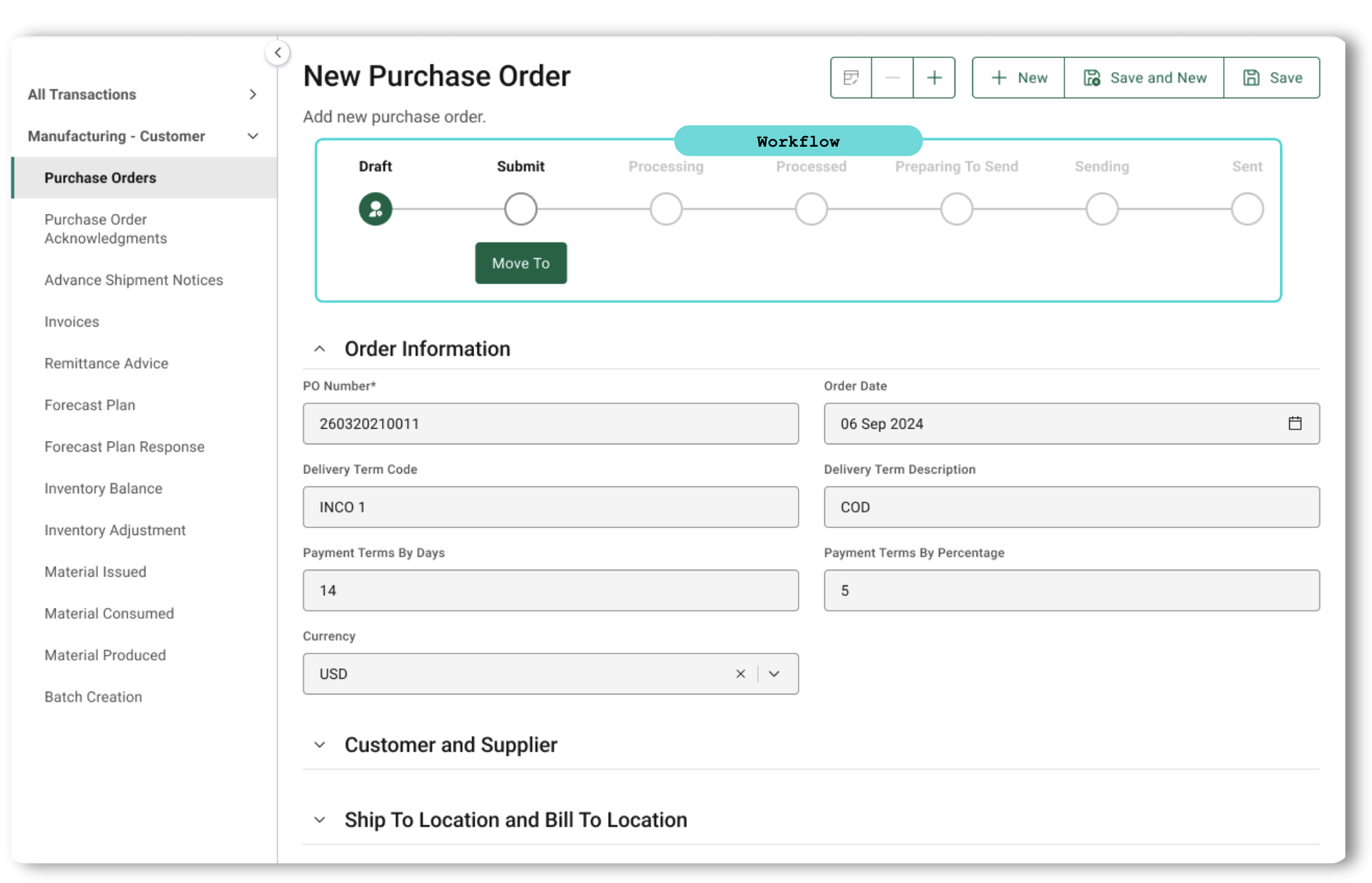This guidance outlines the essential practices for designing workflows for metadata-driven solutions. As we go through the design guidance, we will offer insight into the nuances of workflows for primary objects and business transaction objects (BTOs).
**Tip**: Before configuring your workflow in OPUS Solution Environment (OSE), identify your specific business requirements and define the desired workflow states, transitions, conditions, and actions. Some of this definition occurs during the model stage and may require collaboration with your OPUS Developer. Diagramming a workflow is a great exercise to drive that definition while curating your business object. This should be done early in the definition process. Modeling your objects correctly will make configuring your workflow much easier.
## Collaboration: The Foundation of an Effective Workflow
As a Solution Designer, collaboration with the Orchestration Architect is crucial when defining workflows. The Orchestration Architect, as the domain expert, offers valuable insights into supply chain processes and use cases, helping to define workflow states that are meaningful to the user and to the customer’s business process. Together, you will combine your understanding of configuration options with the Orchestration Architect's domain knowledge to design workflows that are both user-friendly and aligned with business needs. This partnership ensures a shared understanding of where additional configurations might be required to meet specific business objectives.
## Layout
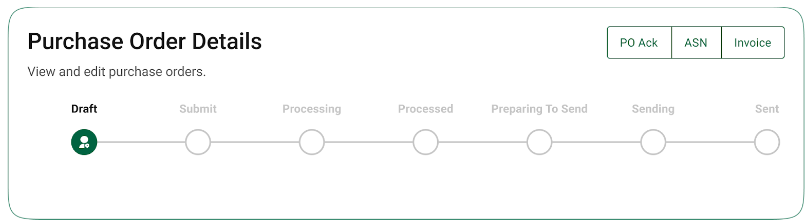When designing your workflow, keep in mind the workflow UI within the greater page. The workflow is always placed under the object/title and toolbar. Depending on the number of states, the length of your workflow may differ, but it will always be center-aligned to maintain balance on the page and in relation to its surrounding information.
The workflow will display on a View/Edit page, but the Move-To button will only display while in edit mode and changes will need to be saved.
There is no UI work needed here. If the desire is to configure a workflow (making it a company workflow), the focus should be on the logical flow of the workflow, the labeling, and the various conditions and post-transition actions that may be leveraged to facilitate an effective business process.
## Workflow “Musts”
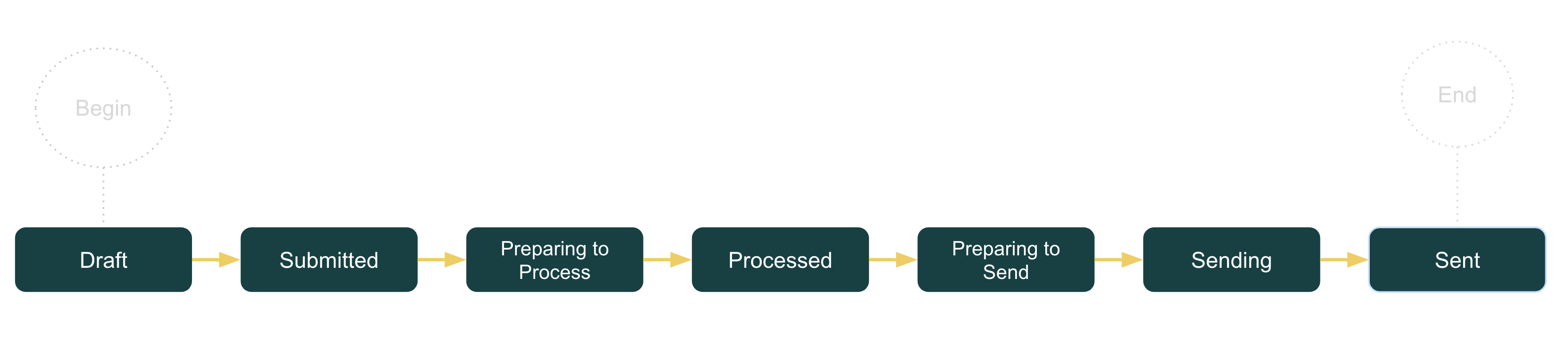When designing solutions, there are essential principles governing the workflow design:
1. Every business object type *must* have a workflow.
2. Every object type must adhere to the states and transitions once defined, and if substates are used they are in the context of a base state.
3. Workflows must be intuitive to end users so there is enough clarity to move through the workflow. This means the labeling and functional flow are intuitive to their defined business process surrounding that object.
4. For business objects, keep the workflows as simple as possible for consistency and flexibility. Ask yourself, ”Do I need to configure this for a specific business need, and if yes, how can I do that simply and consistently?”.
5. For BTOs, ensure you understand the standard workflows, as the standard workflow is used across all B2B transactions.
## Workflow Conventions: Capturing Real-World Processes
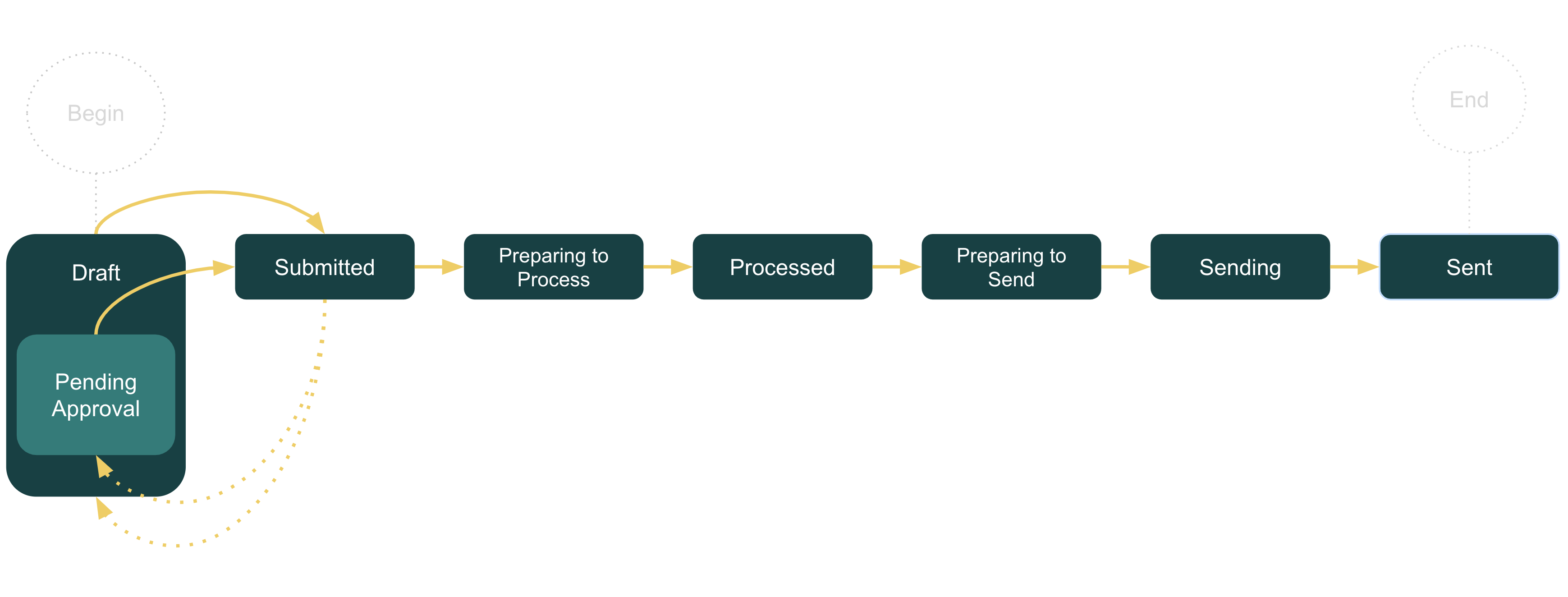
Content design is crucial throughout all phases of solution design. In workflows, it is especially important to use intuitive substate labels that accurately reflect real-world business processes. This approach helps users instinctively understand the next steps, allowing them to move through the workflow more quickly and efficiently.
There are many building blocks that assemble a workflow, and each must be critically thought through both functionally and when naming.
### Readability
- Use plain language that all users can easily understand.
- Avoid abbreviations and jargon that might be unclear to some users.
- Avoid acronyms to ensure clarity.
### Consistency in Language
- Start simple since simple is always easier to keep consistent. For example, **To Do**, **In Progress**, and **Done** (base workflow for business object).
- Leverage our existing workflows by creating company BTOs for more complex use cases with various transactions (the example used in the previous section). If you use this capability, the base states from the original object will already help with the consistency, as those states are inherited by the company object type.
- Maintain consistent substate usage, labeling, and transitions of those states across business objects based on the use case. Business objects used within different orchestrations, even when used in different solutions, should not significantly deviate from each other.
- Use active tense for substate labels to clearly indicate the current state (e.g. **In Progress** and **Pending Review**).
## Configuration
As a Solution Designer, you want to put extra thought into your workflows even before jumping into the configuration in OSE. If you have vetted the business requirements and use cases, you may decide to take a standard workflow and configure it as a company workflow to meet those requirements. The following outlines which configuration options you have to work with.
### State and Substate Definitions
- **Base States** (*not configurable*) – This should be where you start. Understand the original base states that were defined during the data modeling process (in collaboration with the OPUS Developer and Orchestration Architect). Each base state should already be clearly represented in OSE’s workflow editor where you can configure your substates.
- **Substates** – You can define substates in OSE within each base state to provide more detailed tracking of the process.
- **Considerations**
- Ensure that substates are relevant and necessary for the specific business context (in short, don’t compromise simplicity and consistency when not absolutely necessary).
- Once a substate is added, the base state is no longer reflected, and it becomes a mere container for the base state. Determine if an additional substate is needed to reflect something similar to the base state (e.g. a **Not Started** substate within a **To Do** base state).
- Even if a UI is not required for your solution, you will still be able to leverage OSE’s workflow configurations. Consider maintaining consistency in your workflows regardless of if the UI is needed to support hybrid use cases where companies end up using systems and then add a UI option later. This will prevent deviation in process and tracking.
### Transitions
Transition Conditions
- If you are an intermediate Solution Designer, you can leverage some basic JavaScript for more complex use cases that require additional criteria to move between certain states.
- Considerations
- Consider the specific behaviors and use cases that may result in a need to extend the application’s logic.
- Before removing a transition, consider the impact and if it will break the process flow.
Post-Transition Actions
- If you are an intermediate Solution Designer, you can leverage some basic JavaScript for more complex use cases that require additional criteria to move between certain states.
- Considerations
- Consider the specific behaviors and use cases that may result in a need to extend the application’s logic.
[TraceLink University](/tags/tracelink-university)
#### Table of contents
##### Related Content
[  ](/resources/tracelink-university/opus-platforms-metadata-driven-no-code-solutions)
##### The OPUS Platform’s Metadata-Driven, No-Code Solutions
OPUS Solution Designers can create solutions on the OPUS Platform without being data modelers or developers, but understanding core modeling constructs and the benefits of the OPUS approach is beneficial before using the OPUS Solution Environment (OSE).
[View More](/resources/tracelink-university/opus-platforms-metadata-driven-no-code-solutions)
[  ](/resources/tracelink-university/optimizing-solution-delivery-predefined-object-operations-opus)
##### Optimizing Solution Delivery With Predefined Object Operations in OPUS
Object operations are central to OPUS's no-code, metadata-driven framework, enabling user interaction with business objects through predefined actions, with automatic generation of these operations from metadata configurations that enhance consistency and accelerate solution delivery.
[View More](/resources/tracelink-university/optimizing-solution-delivery-predefined-object-operations-opus)
[  ](/resources/tracelink-university/understanding-page-types-within-opus-solution-environment-ose)
##### Understanding Page Types within the OPUS Solution Environment (OSE)
Page types enable Solution Designers to efficiently create user-friendly pages using a drag-and-drop interface, allowing them to organize information for optimal usability.
[View More](/resources/tracelink-university/understanding-page-types-within-opus-solution-environment-ose)
[  ](/resources/tracelink-university/design-considerations-roles-and-policies)
##### Design Considerations With Roles and Policies
User access in a solution is managed through permissions, roles, and policies: permissions define specific actions, roles group these permissions for streamlined access, and policies enforce the logic that determines what users can do, ensuring data protection and security compliance.
[View More](/resources/tracelink-university/design-considerations-roles-and-policies)
[  ](/resources/tracelink-university/get-started-designing-opus-platform-opus-anthem)
##### Get Started Designing on the OPUS Platform With OPUS Anthem
Anthem is TraceLink's Design System that establishes consistent design conventions across the OPUS Platform, allowing designers to quickly create solutions that meet various business and user needs.
[View More](/resources/tracelink-university/get-started-designing-opus-platform-opus-anthem)
[  ](/resources/tracelink-university/ux-writing-and-terminology)
##### UX Writing and Terminology
The goal is to create UI text that is clear and concise, offering users the essential information they need to effectively complete their tasks.
[View More](/resources/tracelink-university/ux-writing-and-terminology)