
Home
  • AI Mode
  • Supply Chain Orchestration
    fast
    Supply Chain Orchestration
    • Life Sciences Company
    • Direct Material Supplier
    • Contract Manufacturer
    • Third Party Logistics
    • Wholesale Distributor
    • Healthcare Provider
    • Retail Pharmacy
  • Network
  • Products
    fast
    Products
    • Multienterprise Information Network Tower (MINT)
    • Process Orchestration for Empowered Teams (POET)
    • Track-and-Trace
  • Resources
    fast
    Resources
    • Resource Center
    • TraceLink University
    • TraceLink Glossary
    • Partners
    • Community
    • Events
    • Customers
  • About
    fast
    About
    • Our Story
    • Newsroom
    • Culture and Careers
    • Leadership
    • Our Values
    • Corporate Social Responsibility
    • Contact Sales
  • Log In
    • Tracelink Classic
      TraceLink Classic app.tracelink.com
      Redirect
    • Opus Platform
      Opus Platform opus.tracelink.com
      Redirect
Log In
  • Tracelink Classic
    TraceLink Classic app.tracelink.com
    Redirect
  • Opus Platform
    Opus Platform opus.tracelink.com
    Redirect
Tracelink University

Breadcrumb

  1. Home
  2. Resources
  3. TraceLink University

Design Considerations With Roles and Policies

Governing User Access
banner-image
  • Download PDF
  • Share
    • LinkedIn
    • Facebook
    • Mail
    • Twitter

Table of contents

Overview


Users’ access to data and operations in a solution is controlled by permissions, roles, and policies. Each of these elements is defined separately, but all 3 work together to protect your data and ensure your solution meets your company’s security standards.

  • Permissions govern what a user can and cannot do inside OPUS. For example, a TraceLink product might have separate permissions that allow users to view existing purchase orders, edit existing purchase orders, or create new purchase orders. Each TraceLink product comes with a set of predefined permissions. Solution Designers cannot modify permissions.
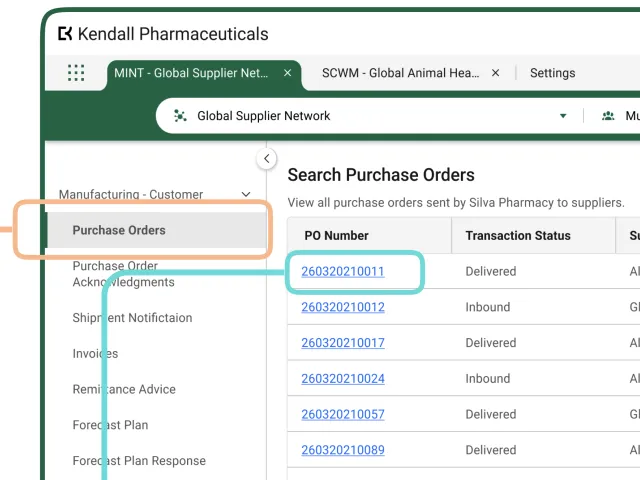
  • Roles group together one or more permissions to define the level of access that can be assigned to a user. For example, instead of needing to assign 3 separate permissions to a user so they can view, edit, and create purchase orders, those permissions can all be included in a single role called Manufacturing - Customer. The role can then be assigned to one or more users at the same time, drastically reducing the chances that the incorrect permissions will be given to a user and ensuring that all users of the same type have the same level of access. Solution Designers can create new roles or modify existing roles by adding or removing permissions.
  • Policies supply the logic for the permissions that are associated with a role. In most cases, the policies included in a Standard or Marketplace solution (i.e. the solution your Company Solution is based on) handle role-based authorization, which verifies that the user is assigned to a role that has permission to perform a given action. A policy is associated with an enforcement point, which is the point in a process where TraceLink checks that the current user has permission to perform the attempted action. Solution Designers can update a policy if their product requires security logic that is not supported by existing permissions. For example, if there are not different permissions for users to create new domestic purchase orders and new international purchase orders, a Solution Designer could create 2 separate roles and modify the logic of the policy to ensure that only the appropriate role could create a domestic or international purchase order. Modifying policies is an advanced topic that Solution Designers should not attempt without consulting with their company’s security team and their TraceLink Services representative.
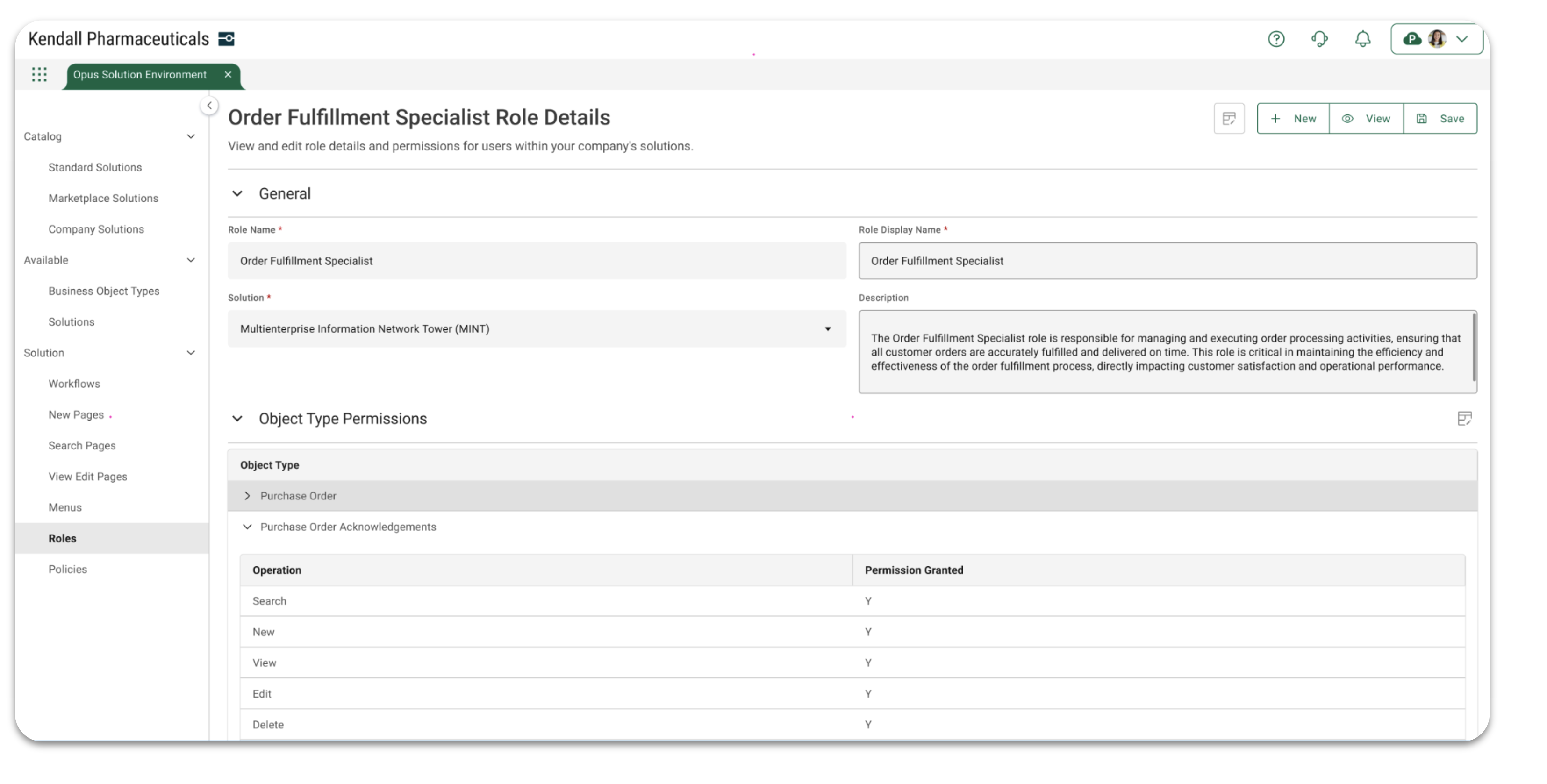
MINT Roles

Permissions Patterns

TraceLink solutions come with a standard set of permissions out-of-the-box:

  • Search
  • New
  • View
  • Edit
  • Delete
  • Import
  • Export
  • Custom Operation

When creating or editing a role, these permissions are applied to the object types defined in the solution to define the operations the user with the given role can perform.

Role Patterns

Roles in Standard and Marketplace Solutions are created to support the use cases and business needs that are met by those solutions, not to support every possible use case. They reflect the scope of the Standard or Marketplace Solution, which could be much different from the scope of a Company Solution. Therefore, when considering roles for a Company Solution, start by considering the use cases that are unique to your company, and extrapolate from that the roles necessary to meet those use cases. For example, MINT supports 4 different orchestrations (Manufacturing, Logistics, Commerce, and Clinical Supply), each of which has unique tasks for inbound and outbound messages. Therefore, MINT provides 8 out-of-the-box roles to support the use cases for those different orchestrations. Companies with more use cases involving the Clinical Supply orchestration may want to have more roles in that domain, so they would be created as part of their Company Solution.

The name of a role should be meaningful and speak to the work that will be performed by users with that role. Instead of providing general names (e.g. User, Member, Advanced Member), use descriptive names that indicate the tasks the user will perform or the department in your organization whose members will have the role (e.g. Development Operations, Clinical Trials Client Services). Even if your solution has only one role, resist the urge to give the role a vague name, so your role names can scale along with your company.

Common Roles

Every company must have at least one user with the role of System Administrator, and each TraceLink product licensed by a company should have at least one user with the role of TraceLink Administrator. Otherwise, the roles within a product depend on how the company divides its responsibilities among its employees and the data the product works with. A small company with only a few users may have a small number of roles with access to most or all of the functionality within a product, while a larger company that compartmentalizes its data would have more roles with more limited scope. It is common that a solution for a product that handles a large number of use cases or orchestrations will have a role for decision-makers or stakeholders whose domain spans multiple use cases to view most or all of the data in the solution.

Configuration

Before you design your company solution’s roles, you need to have comprehensive knowledge not only of the solution’s operations and the use cases the solution solves, but also the existing workflows and your company’s org chart. If you know who the users are, what they need to do, what object types they need to work with, and when in the process they need to do it, configuring the roles should be a simple task.

The only configuration possible in OPUS Solution Environment (OSE) is applying permissions to the object types in the solution and specifying whether or not the solution’s menus are visible in the side menu. The object type permissions have self-explanatory names and map to the typical tasks that users will perform on the object types. The menus should already be defined based on the solution’s object types, so specifying the menu entries that appear in the side menu should naturally arise from the operations the role can perform.

Note that an Administrator role within a product does not automatically grant Standard Access or Expanded Access to users with that role.

Creating Company Roles

To learn more about how to add new roles and modify existing roles in the OPUS Solution Environment, see the OPUS Solution Environment (OSE) Help Center.

Assigning Users to Roles

To learn more about how to apply roles to users with the Administration solution, see the Administration Help.

TraceLink University

Table of contents

Related Content
The Opus No-Code Approach
The OPUS Platform’s Metadata-Driven, No-Code Solutions
OPUS Solution Designers can create solutions on the OPUS Platform without being data modelers or developers, but understanding core modeling constructs and the benefits of the OPUS approach is beneficial before using the OPUS Solution Environment (OSE).
View More
Page Types
Understanding Page Types within the OPUS Solution Environment (OSE)
Page types enable Solution Designers to efficiently create user-friendly pages using a drag-and-drop interface, allowing them to organize information for optimal usability.
View More
Workflows
Define and Design Workflows
This guidance outlines essential practices for designing effective workflows that enhance efficiency and flexibility in business processes, focusing on primary objects to help OPUS Solution Designers create impactful solutions.
View More
Operations
Optimizing Solution Delivery With Predefined Object Operations in OPUS
Object operations are central to OPUS's no-code, metadata-driven framework, enabling user interaction with business objects through predefined actions, with automatic generation of these operations from metadata configurations that enhance consistency and accelerate solution delivery.
View More
Anthem Design Guide
Get Started Designing on the OPUS Platform With OPUS Anthem
Anthem is TraceLink's Design System that establishes consistent design conventions across the OPUS Platform, allowing designers to quickly create solutions that meet various business and user needs.
View More
Anthem Design Guide
UX Writing and Terminology
The goal is to create UI text that is clear and concise, offering users the essential information they need to effectively complete their tasks.
View More

Cookie Settings

When you visit any website, it may store or retrieve information on your browser, mostly in the form of cookies or similar tracking technologies. Please see below for an overview of the categories of cookies and similar technologies used on this site. You can allow or deny some of all of them, except Strictly Necessary Cookies which are required to provide the site to you. However, blocking some types of cookies may impact your experience of the site and services we are able to offer.

Please see our Cookie Policy for more details, including a list of the cookies we use. You can change your consent options at any time by following the “Cookie Settings” link in the Cookie Policy.
'Strictly Necessary' cookies let you move around the Site and use essential features like secure areas, shopping baskets and online billing. Without these cookies you would not be able to navigate between pages or use certain vital features of our Site, so we do not require your consent for their use. These cookies don't gather any information about you that could be used for marketing or remembering where you've been on the internet. For example, we use these Strictly Necessary cookies to identify you as being logged in to the Site. You can set your browser to block or alert you about these cookies, but if you do so, some parts of the Site will not work.
'Performance' cookies collect information about how you use the Site, such as which pages you visit, the time spent on the Site and if you experience any errors. We use performance cookies to provide aggregated statistics on how the Site is used and help us improve the Site including by measuring any errors that occur.
'Functional' cookies are used to provide services or to remember settings to improve your visit. We use 'Functionality' cookies to remember your settings and choices and show you when you're logged in to the Site.
‘Targeting' cookies are linked to services provided by third parties, such as 'Like' buttons and 'Share' buttons. The third party provides these services in return for recognizing that you have visited the Site. We also use 'Targeting' cookies to gather information that could be used to display content that we think may interest you.

Footer

  • Quick Links
    Get a Demo
    TraceLink Network Directory
    The Network
    OPUS Platform
    Technical Support
    Open Jobs
    API: Terms of Use
  • Products
    Multienterprise Information Network Tower
    U.S. DSCSA Compliance
    Targeted Recalls
    Process Orchestration for Empowered Teams
    Serialization
    Global Compliance
  • Resources
    Resource Center
    Events
    TraceLink University
    Partners
    Community
  • About TraceLink
    Our Story
    Newsroom
    Culture & Careers
    Leadership
    Our Values
    Corporate Social Responsibility
  • Hot Topics
    Transaction Integration
    Supply Chain Visibility
    DSCSA Compliance
    Process Orchestration
    Kazakhstan Compliance for Pharmaceuticals
    Kyrgyzstan Compliance for Pharmaceuticals
Follow Us on Social
Facebook
Linkedin
X
Legal & Trust.
© TraceLink Inc. 2009-2026 All Rights Reserved
Contact Us Today
Contact us today to begin your journey toward agentic supply chain orchestration — digitalize your end-to-end supply chain with intelligence, flexibility, and collaborative orchestration.
Contact Us
Stay Up-to-Date
Subscribe to receive industry insights and stay at the forefront of evolving trends.
Subscribe