
Table of contents
As an OPUS Solution Designer, you do not need to become a data modeler or even a developer to create solutions on the OPUS Platform. As metadata is the foundation to all OPUS solutions, it is still useful to understand the core modeling constructs of a solution and the benefits of the OPUS approach to delivering solutions before jumping into using OPUS Solution Environment (OSE) to create and configure solutions.

An Opinionated User Interface (UI) Drives User Efficiency, Lowers Design and Development Costs, and Enhances Business Outcomes
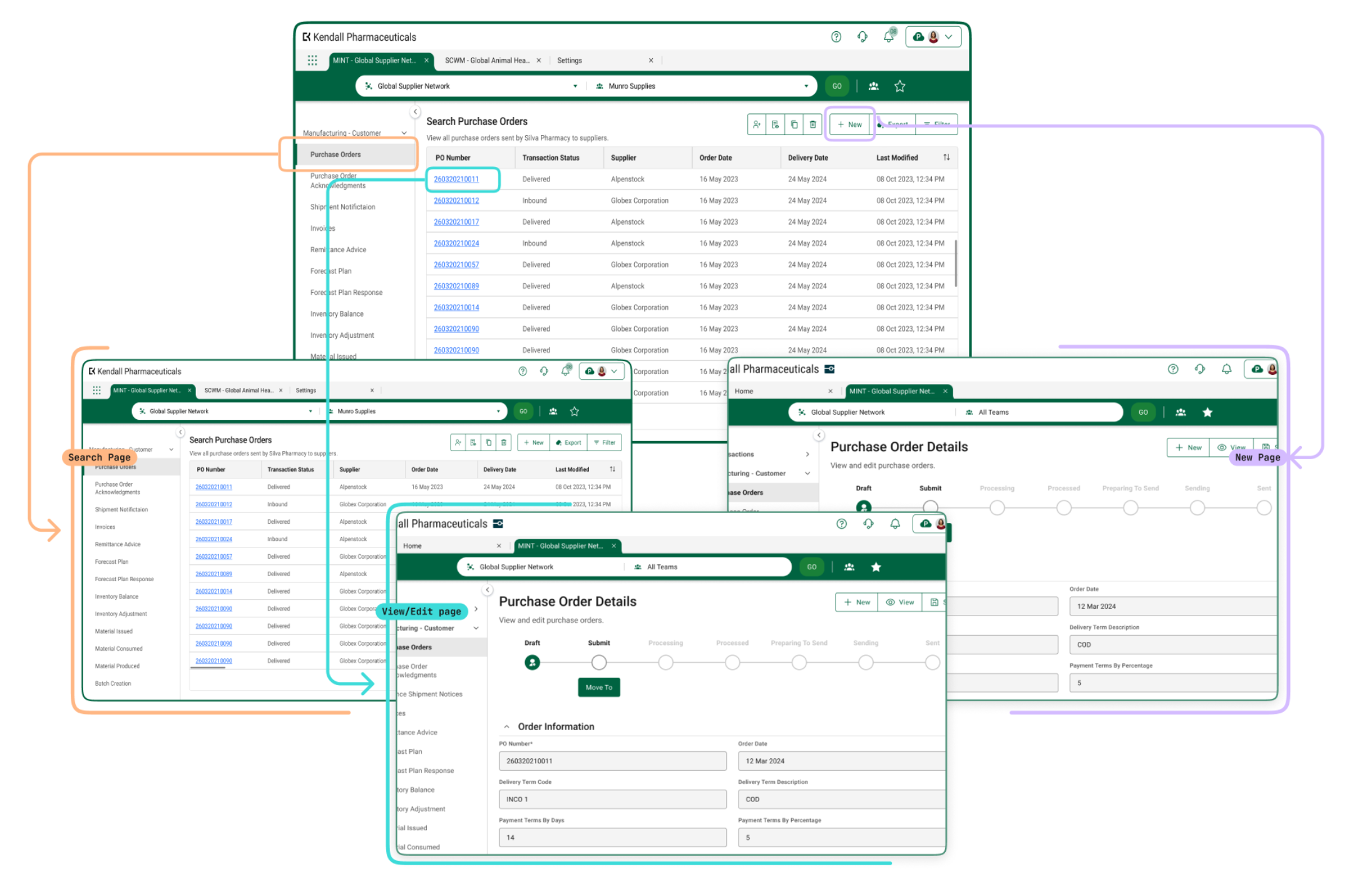
An effective way to understand these constructs is by focusing on the user's perspective and their interactions with the user interface’s (UI's) behavior. In the discipline of User Experience (UX), when it comes to enterprise and multienteprise design, consistency is key. Professionals face constant competing priorities and should not have to spend cognitive energy learning, unlearning, and relearning different patterns across the various solutions they interact with to do their job. Similarly, organizations need the agility to pivot and adapt to rapidly evolving business needs, especially in complex industries like life sciences. An opinionated UI addresses both of these challenges.
An opinionated UI is a user interface designed with conventions and predefined structures that guide users toward a specific way of interacting with the system. It reduces cognitive load by ensuring consistency in layout, navigation, structured information, and interactions with that information.
Similarly, it guides OPUS Solution Designers in creating solutions that are ultimately delivered to users, significantly diminishing decision fatigue while accelerating solution delivery. This allows designers to stay focused on the problem they are solving and the information at hand, rather than on UI design and implementation or other key features, like workflows.
To recap, OPUS’s opinionated UI equips OSE with:
- Predefined layouts, components, and workflows, so designers don’t have to make complex design choices, and users have a uniform view of their solution.
- Standardized behaviors across solutions, ensuring users interact with similar elements in the same way, such as navigation elements or actions.
- Out-of-the-box configurations, reducing the need for complex application logic while still offering flexibility where necessary.
By prioritizing seamless design, ease of use, predictability, and consistency, an opinionated UI limits unnecessary options while maintaining flexibility for key business needs. All of this functionality is metadata-driven, allowing it to function without requiring additional code, making it accessible to everyday professionals who may want to configure solutions to meet their specific needs.
Defining Objects and Metadata: The Core Building Blocks of OPUS Solutions
The OPUS Object-Centric Approach
At the heart of OPUS solutions lies an object-driven approach that organizes business processes around distinct entities called primary objects. These objects, which are typically represented as nouns like purchase orders, invoices, users, shipments, or products, are foundational to the data model. Every object type encapsulates specific information and behaviors that provide structure to how data is stored, processed, and presented within the solution. In OPUS, these primary objects, alongside their characteristics (fields of information) and operations (actions like creating, viewing, or editing), shape the user experience.
This object-centric design, powered by OPUS metadata, ensures that navigation, information consumption, and interactions are consistently focused on specific objects, while offering flexibility in OSE for configurations that can support and scale these objects across diverse business scenarios.
Robust Objects for Diverse Business Process Needs
In the OPUS platform, the object-centric approach is fundamental to how solutions are built and managed. The platform supports a range of objects, including Business Objects, Transaction Objects, and Business Transaction Objects (BTOs), each uniquely supporting unique enterprise and multienterprise use cases through their metadata and workflows.
Any of these objects can be identified (i.e. flagged) as a primary object so that users can interact with these objects directly:
- Business Object – Represents a “thing” within a larger process within a solution, like a Task in POET’s work management processes. These objects use business object workflows which tend to be more simplistic and transition based on human intervention.
- Transaction Object – Represents any object that involves workflows tied to transactions, known as Transaction Workflows, which do not require a human to advance the workflow. These objects handle transactional data across various contexts, such as managing CSV imports for Master Data.
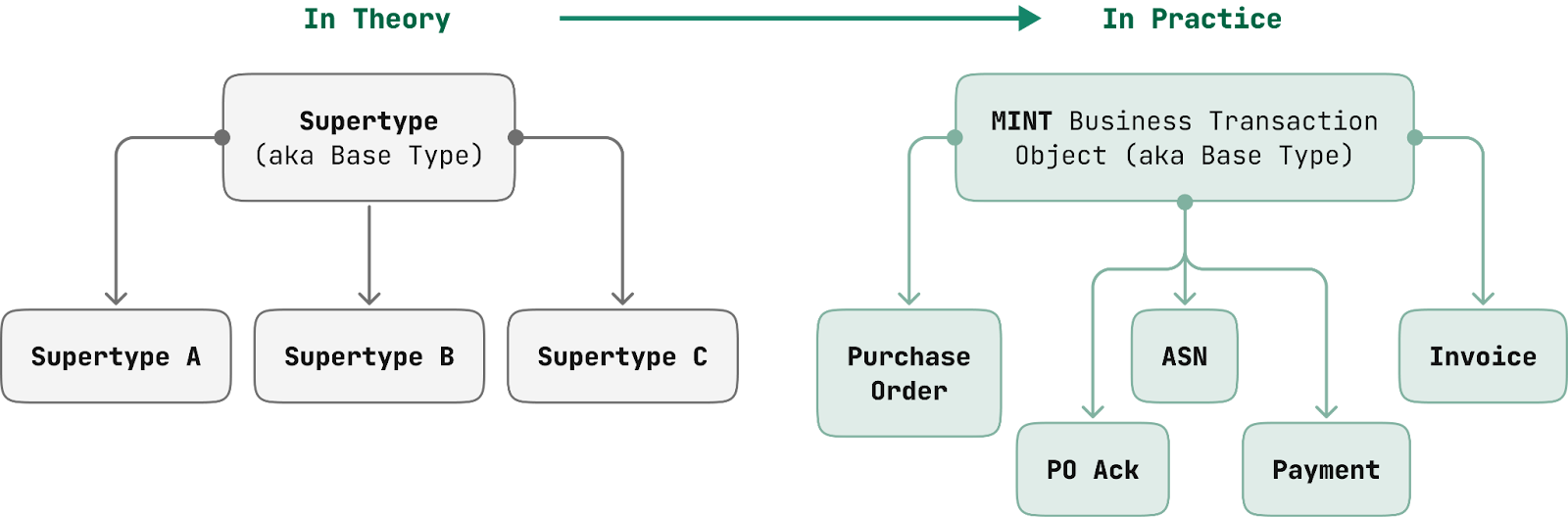
- BTO – A specialized form of a Transaction Object, focusing specifically on orchestrated business processes such as procure-to-pay. These objects are intended to manage and track business-specific transactions, orchestrating key processes efficiently. Example BTOs are Purchase Orders, Invoices, ASNs, and Payments in the MINT solution.
Defining Application Behavior Through Metadata Layers
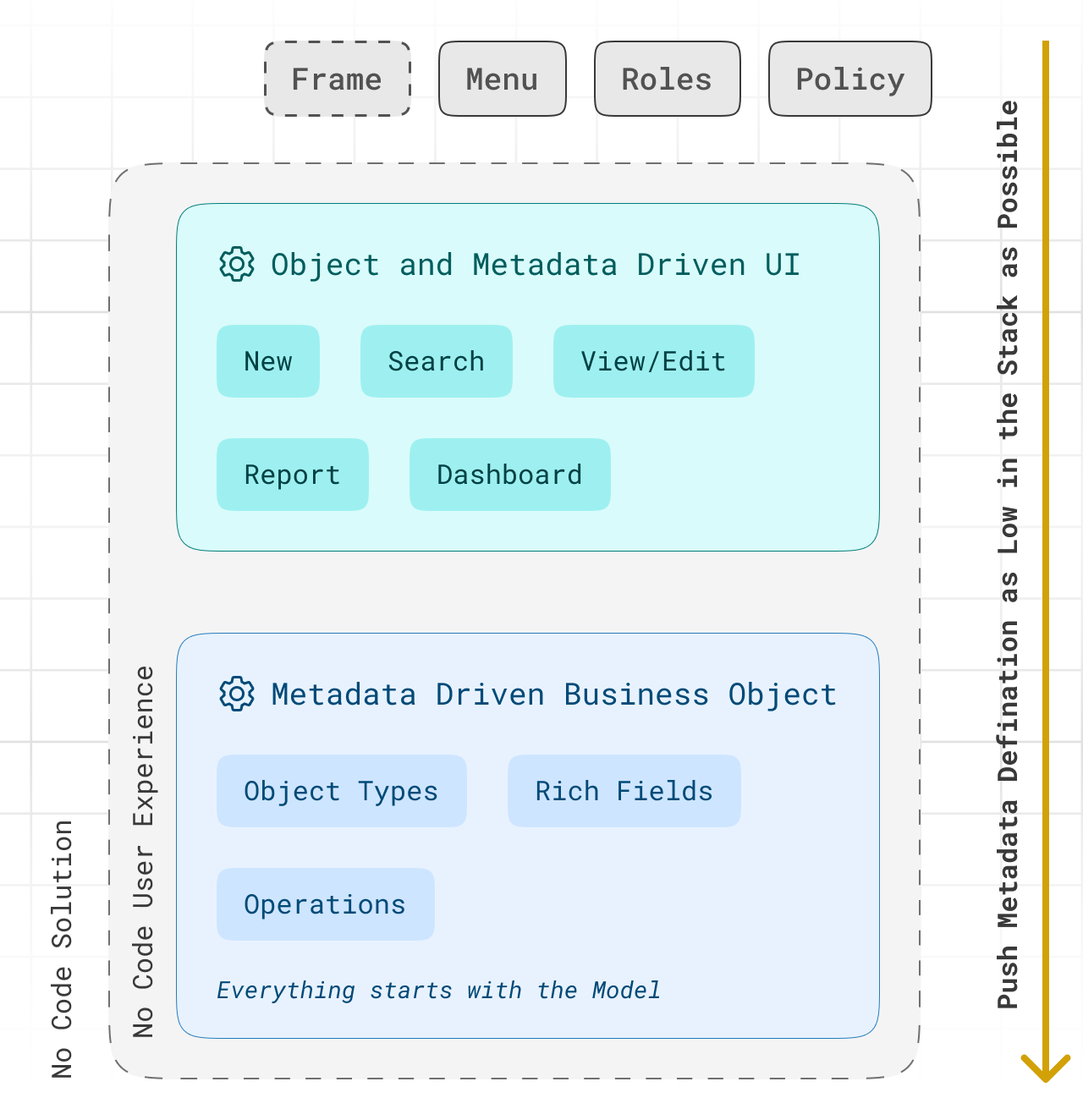
There are 3 layers of metadata the drive the overall user experience:
- Object metadata defines the core characteristics and behaviors of an application, laying the foundation for how the system functions.
- User interface (UI) metadata configures predefined page types (e.g. Search, View/Edit, and New pages) to create a seamless, no-code user experience.
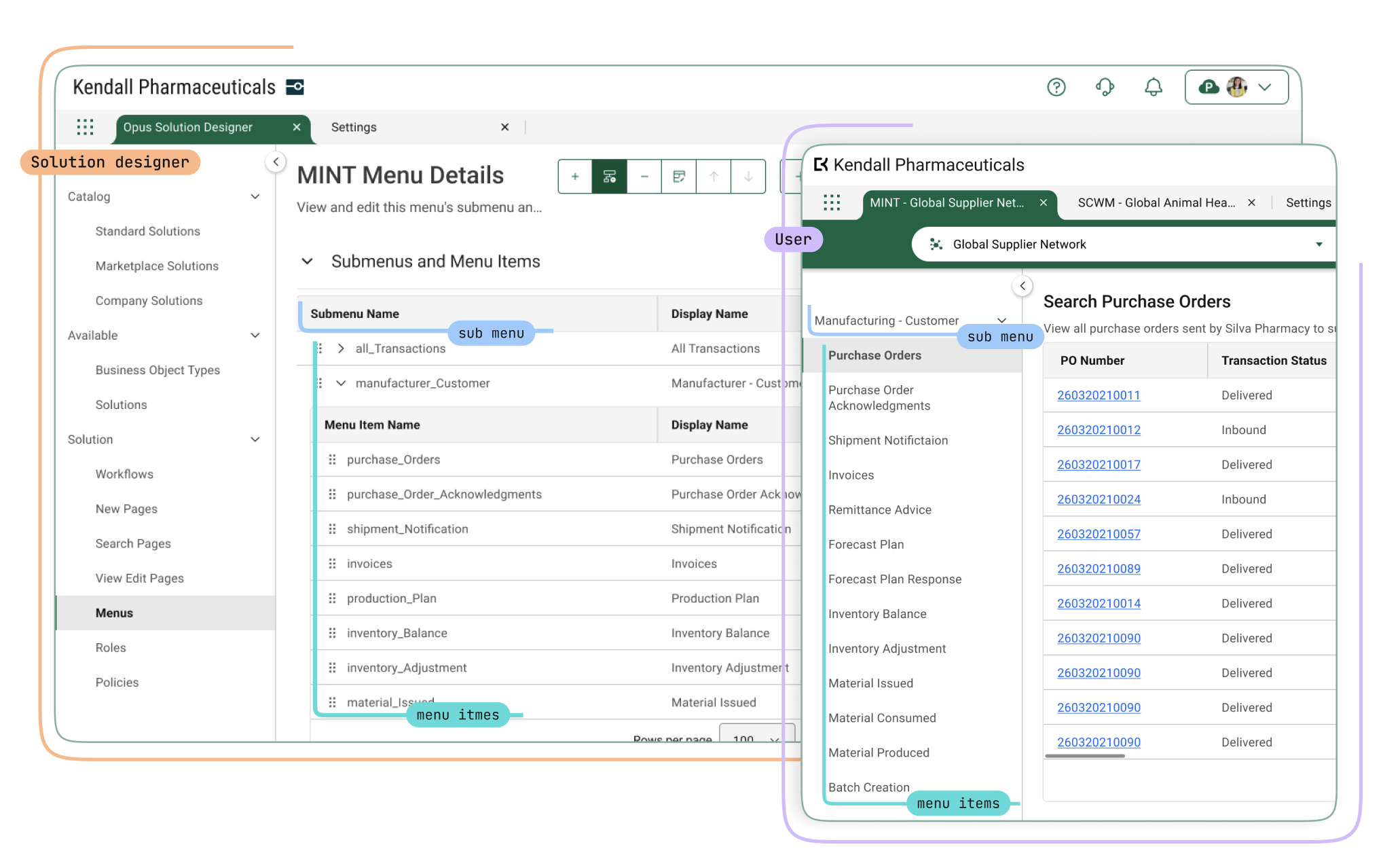
- Solution metadata integrates and fine-tunes the user experience by controlling menus, roles, and permissions, ensuring that authorized users can access the features they need in a structured and efficient way.
Metadata Forms the Foundation of the Rich, No-Code Capabilities in OSE in an Object-Centric Way
OPUS employs the metadata-driven model to define primary objects and their relationships through fields (called rich field types), operations, and workflows, which in turn drive the UI. The UI follows the opinionated design, with predefined page types based on the object type (e.g. Search Purchase Orders, View Purchase Orders, and Create New Purchase Orders). Metadata controls which fields (e.g. text, calendar, date), operations (i.e. buttons or calls to action), and workflow appear on each page, ensuring a consistent experience. Notably, the same object model generates the API, creating a unified system.
Additional components, such as sections, groups, and collections, are also metadata-driven and curate how the information is structured on the page and interacted with.
These are the key elements that create a holistic, metadata-driven experience:
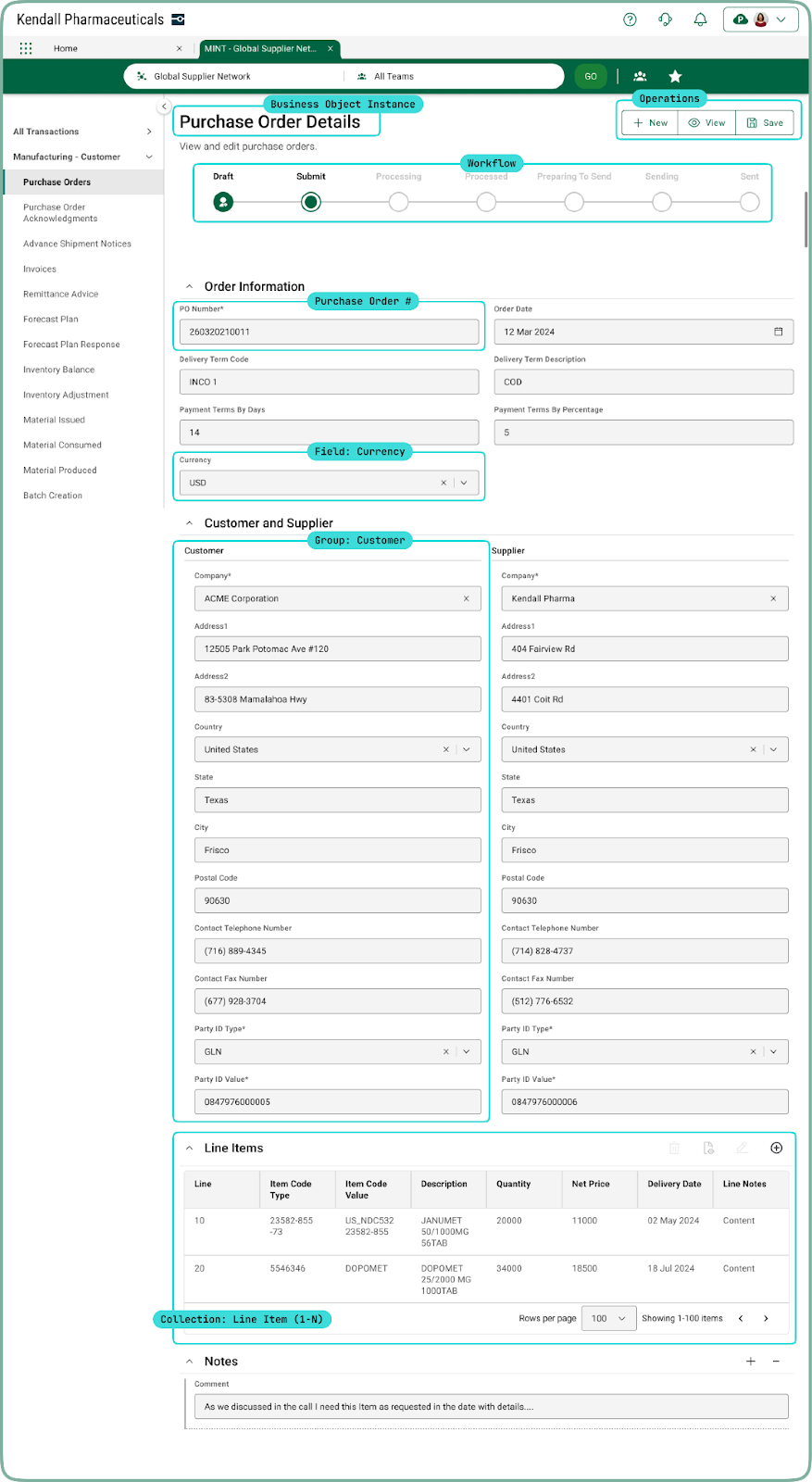
- Object Types and Object Type Instances are the core “thing” users interact with directly within the OPUS UI.
- Operations enable users to search, create, view, and edit objects through dedicated pages, along with other capabilities to modify the information associated with the object.
- Workflow represents the current state of an object and, in some cases, allows users to advance the object through its lifecycle.
- Sections organize page elements and components into 1 or 2 columns, helping structure fields, groups, and collections for better information presentation in the UI.
- Fields represent individual data points on an object and can be either simple (text, number, date) or complex (lookup, auto-number), appearing in the UI as editable or viewable components tied to the object.
- Master-Detail Fields link to shared object types, allowing users to interact with fields like "Shipping Address" that are tied to separate data structures but remain contextually linked to the primary object.
- Lookup Fields utilize relationships between primary objects, enabling users to access object information within or across applications through Lookup by Reference (LBR) or Lookup by Value (LBV) fields. These powerful features interconnect seemingly disparate data and can be applied across various solutions, like Reports and Dashboards which unleashes the full potential of this capability.
- Lookup by Reference (LBR) – When selecting a shipment location, users might start typing "Westborough Plant," and the system recognizes the object. Once selected, the field pulls additional details from that object (e.g. Partner Master Data) from the Master Data Exchange application, not only ensuring accurate selection but accelerating the completion of the overall task.
- Lookup by Value (LBV) – Similar to LBR, but if no existing relationship is found, the field simply captures the value entered by the user.
- Groups organize related fields in the UI so that they are always displayed together, such as in an "Address" group for "Ship to Address" and "Ship from Address."
- Collections display either a field or a group as a list or table, representing multiple instances of data within the UI.
Discover the Core Tenets of Metadata-Driven Data Modeling in the OPUS Solution Environment (OSE)
By understanding these key principles, you'll gain a deeper appreciation of how metadata-driven data modeling enhances flexibility, scalability, and efficiency within the OSE:
- Metadata Drives Business Object Configuration – Metadata in OPUS defines the structure, characteristics, and behavior of primary objects, empowering OPUS Solution Designers to create enterprise and multienterprise solutions using no-code capabilities. Objects and their metadata can be subtyped, which acts as a key accelerator for multienterprise solutions by enabling specialized versions of objects while preserving interoperability. This allows businesses to tailor solutions to their specific needs without changing the core structure, ensuring compatibility across systems. By inheriting the common attributes of an object, subtypes can address unique requirements while still operating within the overall framework, speeding up solution development without compromising interoperability.
- Business Objects Use Metadata for Flexible Configuration – Business objects, like Purchase Orders or Invoices, are defined through metadata, which specifies fields and operations that users can interact with.
- Rich Field Types Provide Predefined and Configurable Components – OPUS offers predefined rich field types (e.g. Date, URL, TextArea) with default components that determine how those fields render and how the user interacts with them.
- Metadata-Driven Pages Simplify UI Creation – Automatically generated pages (New, Search, View/Edit) are based on metadata configurations, making it easy for designers to manage user interactions with business objects.
- Configurable Workflows Enable Process Automation – Workflows are defined through metadata, allowing designers to create automated sequences of states and transitions for business processes.
- Seamless Integration Uses Metadata To Drive Data Exchange – Metadata powers the integration of external systems using Link Actions and Transforms, ensuring flexible and scalable data exchange across enterprises.
- Metadata Modeling Accelerates Solution Customization – By leveraging metadata, Solution Designers can efficiently build, modify, and deploy multienterprise solutions, reducing development time and enhancing flexibility.