
Register for FutureLink Barcelona 2026 Today→
TraceLink — Network for Greater Good
AI Mode Agents AI Solutions Network Resources About
LOG IN TraceLink Classic OPUS Platform
Tracelink University

Breadcrumb

  1. Home
  2. Resources
  3. TraceLink University

Understanding Page Types within the OPUS Solution Environment (OSE)

Exploring the Benefits of Metadata-Driven Pages
banner-image
  • Download PDF
  • Share
    • LinkedIn
    • Facebook
    • Mail
    • Twitter

Table of contents

What Are Page Types in OSE?
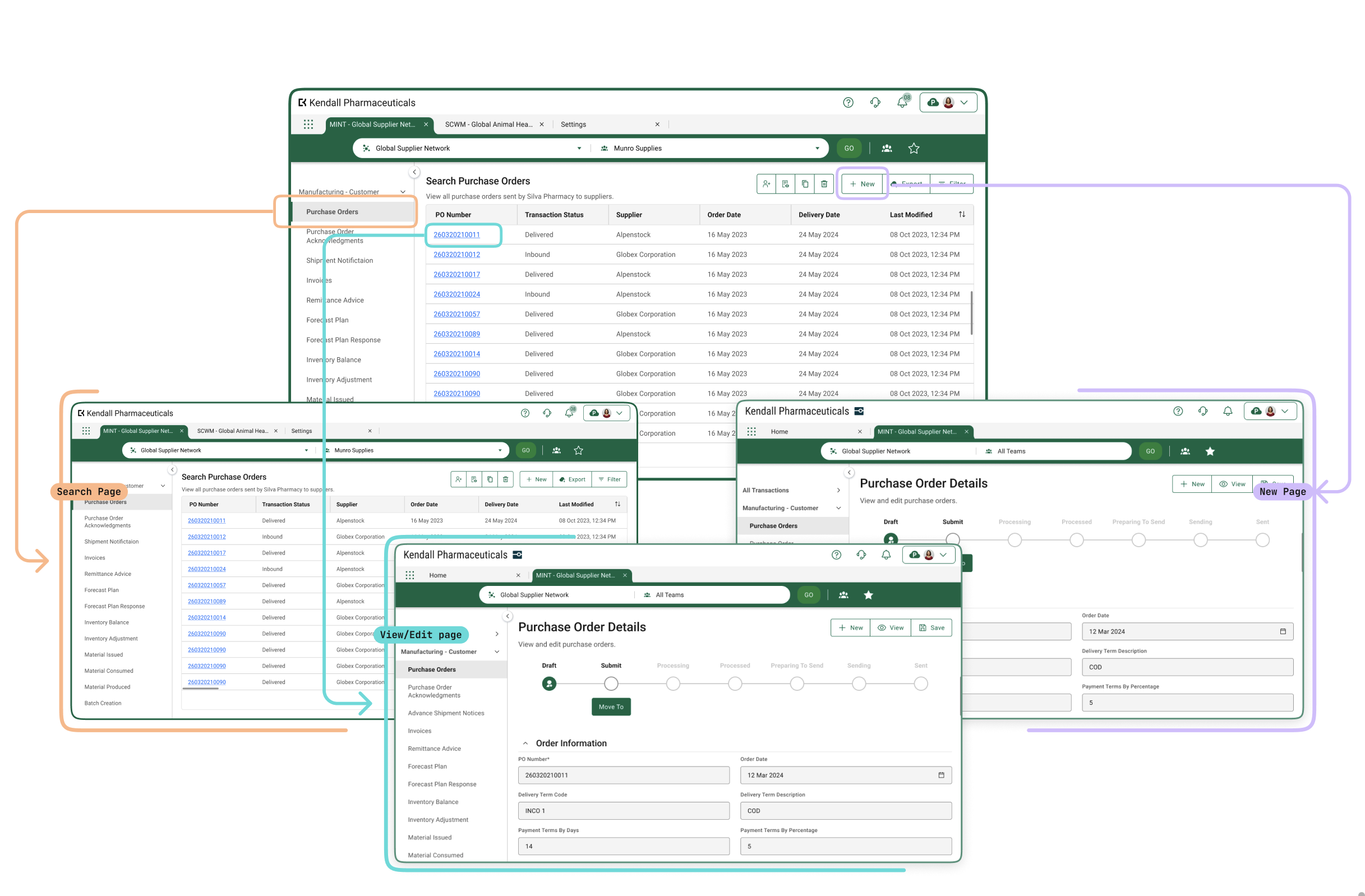
Page Type OptionsPage types are an efficient method for OPUS Solution Designers to create pages for a solution. By using a drag-and-drop interface driven by metadata, designers can build various pages that users will interact with and organize the information on the pages to optimize usability.

Page Types Unleash Innovation in UI and UX Design
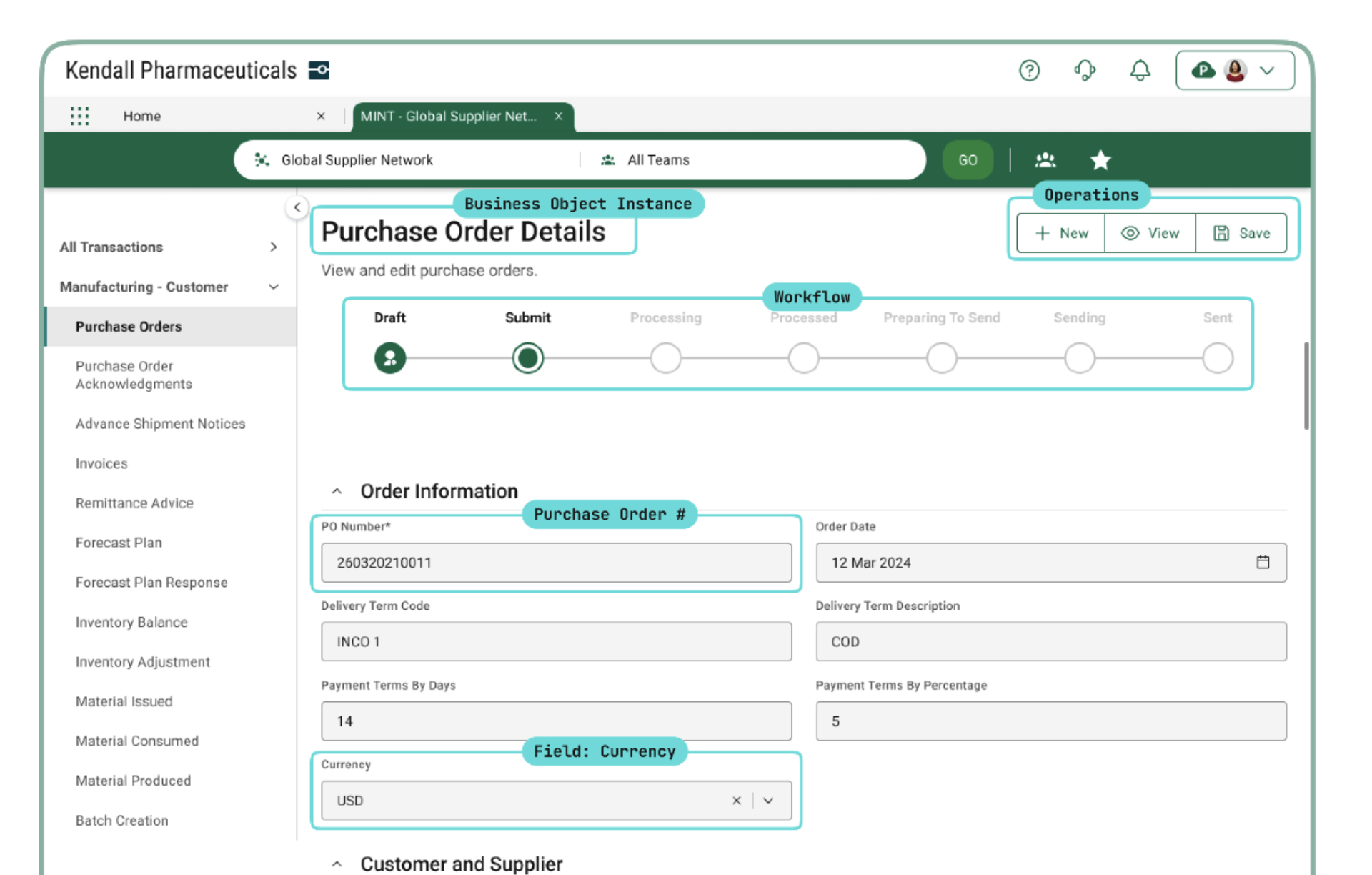
MINT Example of a View Page

Traditionally, creating pages for a product is a tedious manual process involving repeated steps and duplicative effort, and often introduces inconsistency for users. OSE transforms this process by leveraging the object-driven approach. From the moment a solution is created, all UIs are driven off the primary object, where additional metadata is used to curate various pages. When a Solution Designer drags data onto a page, the system intelligently determines the appropriate field type to render. For instance, adding a "Delivery Date" to a Purchase Order Acknowledgment View/Edit page will automatically render a calendar picker.

This innovation not only accelerates time-to-market but also ensures consistent UI pages across all OPUS solutions, reducing costs and enhancing the quality of a user’s experience.

By utilizing these optimized page types, Solution Designers can streamline the design process, improve efficiency, and deliver high-quality solutions rapidly.

What Are the Currently Available Page Types?

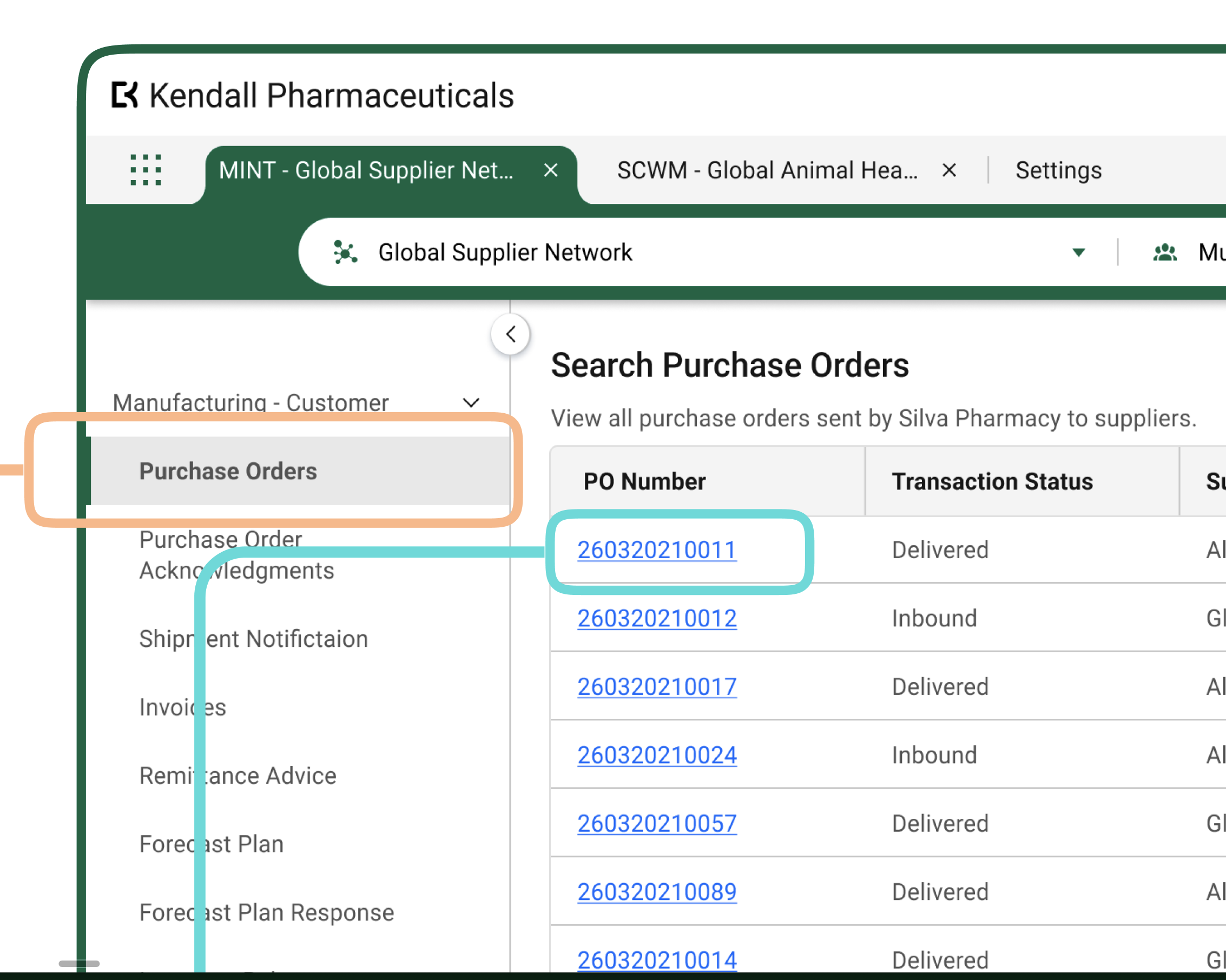
Solution Designers can configure 3 types of pages that users will interact with at runtime:

  • Search Pages – Allow users to search and filter across business object instances (i.e. searching across all purchase orders).
  • New Pages – Enable users to create new object instances (i.e. create a new purchase order).
  • View/Edit Pages – Provide functionality for viewing and editing existing object instances (i.e. view or edit an existing purchase order).


Dive Deeper Into Each Page Type

To explore the details of each page type, please select an option from the Related Resources section below.

 
<a href="/tags/tracelink-university" hreflang="en">TraceLink University</a>

Table of contents

Related Content
The Opus No-Code Approach
The OPUS Platform’s Metadata-Driven, No-Code Solutions
OPUS Solution Designers can create solutions on the OPUS Platform without being data modelers or developers, but understanding core modeling constructs and the benefits of the OPUS approach is beneficial before using the OPUS Solution Environment (OSE).
View More
Workflows
Define and Design Workflows
This guidance outlines essential practices for designing effective workflows that enhance efficiency and flexibility in business processes, focusing on primary objects to help OPUS Solution Designers create impactful solutions.
View More
Roles and Permissions
Design Considerations With Roles and Policies
User access in a solution is managed through permissions, roles, and policies: permissions define specific actions, roles group these permissions for streamlined access, and policies enforce the logic that determines what users can do, ensuring data protection and security compliance.
View More
Sample
Define and Design Search Pages
Search pages enable users to view, search for, and create new object instances, typically serving as the landing page when navigating to a solution, except when only one instance exists (like the Profile page in Settings), in which case the user is directed to the View/Edit page.
View More
Sample
Define and Design New Pages
The New page allows users to create new instances of application objects and includes various essential elements for the process.
View More
Sample Screen
Define and Design View/Edit Pages
Overview, layout, and configuration guide for defining and designing view/edit pages/
View More

Cookie Settings

When you visit any website, it may store or retrieve information on your browser, mostly in the form of cookies or similar tracking technologies. Please see below for an overview of the categories of cookies and similar technologies used on this site. You can allow or deny some of all of them, except Strictly Necessary Cookies which are required to provide the site to you. However, blocking some types of cookies may impact your experience of the site and services we are able to offer.

Please see our Cookie Policy for more details, including a list of the cookies we use. You can change your consent options at any time by following the “Cookie Settings” link in the Cookie Policy.
'Strictly Necessary' cookies let you move around the Site and use essential features like secure areas, shopping baskets and online billing. Without these cookies you would not be able to navigate between pages or use certain vital features of our Site, so we do not require your consent for their use. These cookies don't gather any information about you that could be used for marketing or remembering where you've been on the internet. For example, we use these Strictly Necessary cookies to identify you as being logged in to the Site. You can set your browser to block or alert you about these cookies, but if you do so, some parts of the Site will not work.
'Performance' cookies collect information about how you use the Site, such as which pages you visit, the time spent on the Site and if you experience any errors. We use performance cookies to provide aggregated statistics on how the Site is used and help us improve the Site including by measuring any errors that occur.
'Functional' cookies are used to provide services or to remember settings to improve your visit. We use 'Functionality' cookies to remember your settings and choices and show you when you're logged in to the Site.
‘Targeting' cookies are linked to services provided by third parties, such as 'Like' buttons and 'Share' buttons. The third party provides these services in return for recognizing that you have visited the Site. We also use 'Targeting' cookies to gather information that could be used to display content that we think may interest you.
Register for FutureLink Barcelona 2026 Today→
TraceLink — Network for Greater Good
Log In OPUS Platform · TraceLink Classic
AI Mode
Featured Report The Agentic Supply Chain Operating Model →

Agentic Business Processes

External Manufacturing Logistics Transportation Commerce Compliance

Products

Digital Transaction Exchange Process Collaboration Global Track-and-Trace Regulatory Compliance Real-Time Intelligence

Resources

Resource Center TraceLink University Partners Community Customers Events

About TraceLink

Company Overview Newsroom Culture & Careers Open Jobs Legal & Trust Center Corporate Social Responsibility Network Directory Glossary

Hot Topics

Eliminate Stockouts Improve OTIF Reduce Costs Increase End-to-End Visibility Accelerate Order-to-Cash Optimize Inventory Levels Scale Cross-Partner Execution
Need assistance? Contact Technical Support→

Contact Us Today

Transform your supply chain operations with a human-agent workforce.

Contact Us →

Stay Up-to-Date

Subscribe to receive industry insights and evolving trends.

Thanks — you're subscribed.

© TraceLink Inc. 2009–2026 All Rights Reserved